
Digital Workforce Builder & Operations Dashboard Redesign
RoleProduct Designer
Duration3 Weeks
PlatformWeb
TypeEnterprise Automation / Digital Bots
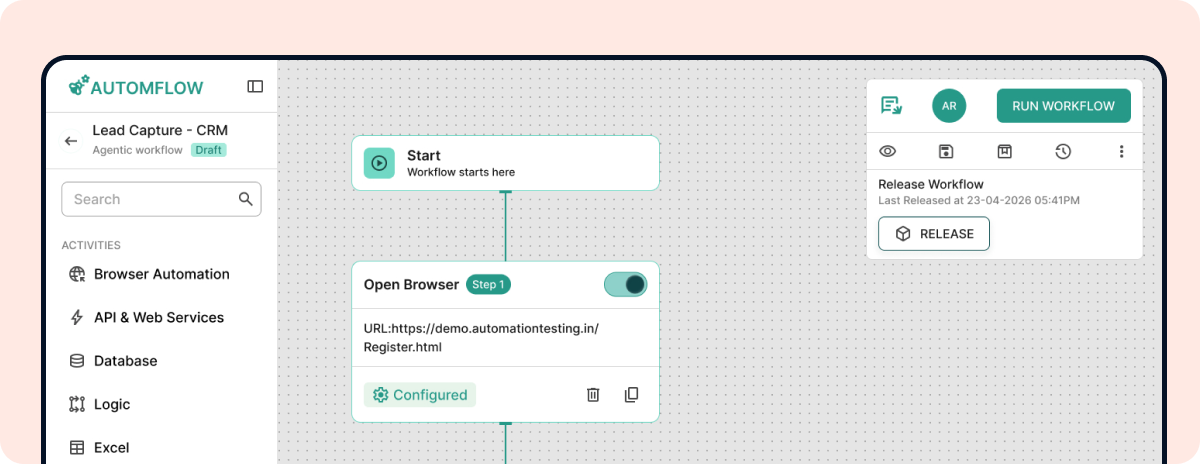
Overview
Enterprise operations teams often manage high-volume workflows that require both automation efficiency and human oversight. Existing systems lacked visibility into workflow states, created delays during manual validation, and made exception handling difficult for operational users.
This project focused on redesigning an AI-assisted workflow platform that streamlines automation processes while maintaining transparency, operational control, and scalable workflow management.
Problem
Operations teams struggled to manage AI-assisted workflows due to fragmented validation handling, inconsistent workflow states, and limited visibility into automation decisions.
Key Challenges
- Manual review processes slowed operational efficiency
- AI validation states lacked transparency
- Users struggled to identify failed or incomplete workflows
- Workflow monitoring required switching across multiple systems
- Exception handling and override actions were unclear
- Complex operational flows increased cognitive load
Goal
Design a centralized workflow platform that enables teams to:
- Monitor AI-driven processes in real time
- Manage validation and exception states efficiently
- Reduce operational friction
- Improve workflow transparency
- Maintain human oversight where required
My Role
Responsibilities
- Workflow architecture planning
- UX strategy for AI-human interaction
- Information architecture
- Workflow orchestration UX
- Validation state design
- Interaction design
- High-fidelity prototyping
- Design-engineering collaboration
Research & Discovery
Through workflow analysis and operational reviews, several usability gaps were identified.
Key Findings
- Operators needed faster visibility into workflow progress
- Validation interruptions delayed operational tasks
- AI confidence and decision states were unclear
- Manual override flows lacked consistency
- Users required simplified monitoring for complex workflows
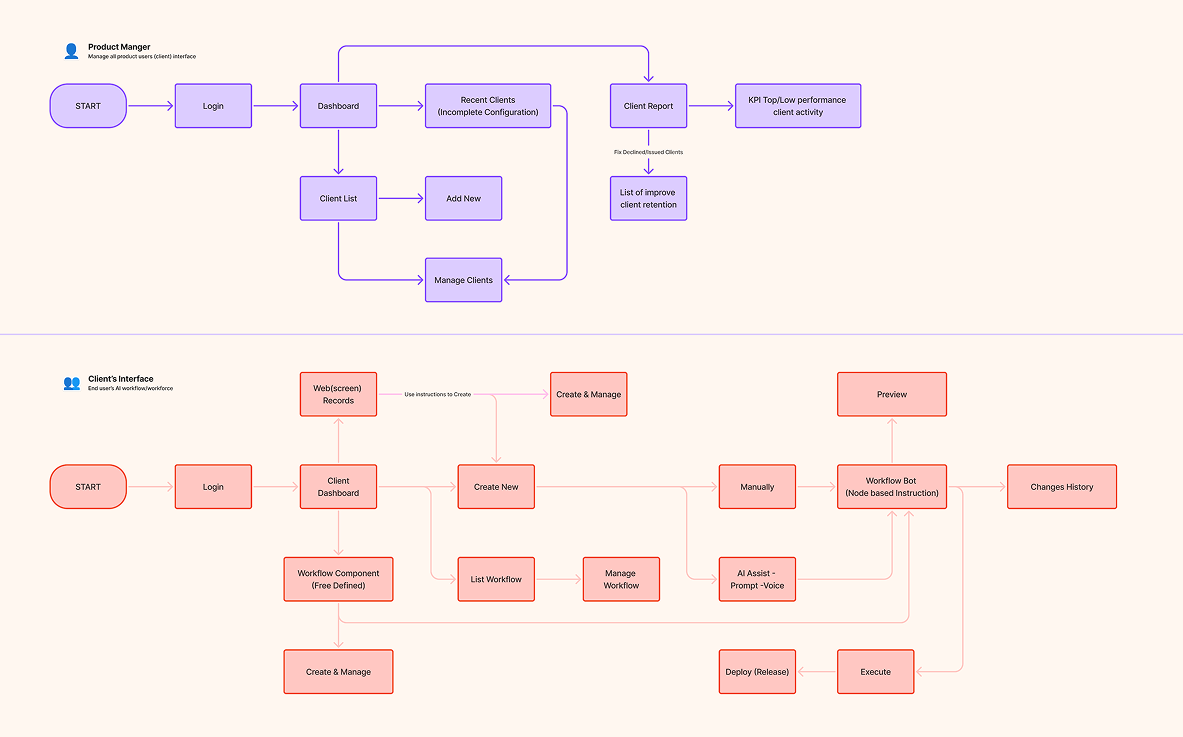
Workflow Architecture
Through workflow analysis and operational reviews, several usability gaps were identified.
The platform was redesigned around a modular workflow orchestration model that combines:
- AI processing
- Validation layers
- Human intervention
- Exception handling
- Execution tracking
Core Workflow Layers
- Input Processing
- AI Validation Layer
- Human Review Layer
- Workflow Orchestration
- Exception Handling
- Final Execution
This structure improved operational clarity while supporting scalable workflow management.
UX Challenges
Balancing Automation & Human OversightUsers needed automation efficiency without losing operational control during critical decision points.
Reducing Cognitive LoadComplex workflow states required simplified visual hierarchy and clearer prioritization.
Improving AI TransparencyValidation results needed to clearly communicate why workflows failed, paused, or required intervention.
Handling ExceptionsThe system required flexible override mechanisms for edge-case operational scenarios.
Design Benchmarking & Workflow Analysis
Competitor analysis of Flowise and n8n helped identify opportunities to simplify enterprise workflow visibility, improve validation transparency, and create a more scalable human-AI operational experience.
Both platforms emphasize:
- Visual workflow orchestration
- AI workflow building
- Human-in-the-loop workflows
- Modular node systems
- Debugging and execution visibility
| Area | Flowise | n8n | My Approach |
|---|---|---|---|
| Workflow Visualization | Strong node-based builder | Technical automation focus | Simplified enterprise orchestration |
| AI Transparency | Good agent visibility | Strong execution tracing | Validation-focused monitoring |
| Human Intervention | HITL support | Approval flows | Structured override handling |
| Complexity Handling | Flexible but dense | Technical-user oriented | Reduced operational cognitive load |
| Workflow Monitoring | Developer-focused | Execution-focused | Operator-friendly visibility |
| Enterprise Usability | Moderate | Advanced but technical | Simplified operational UX |
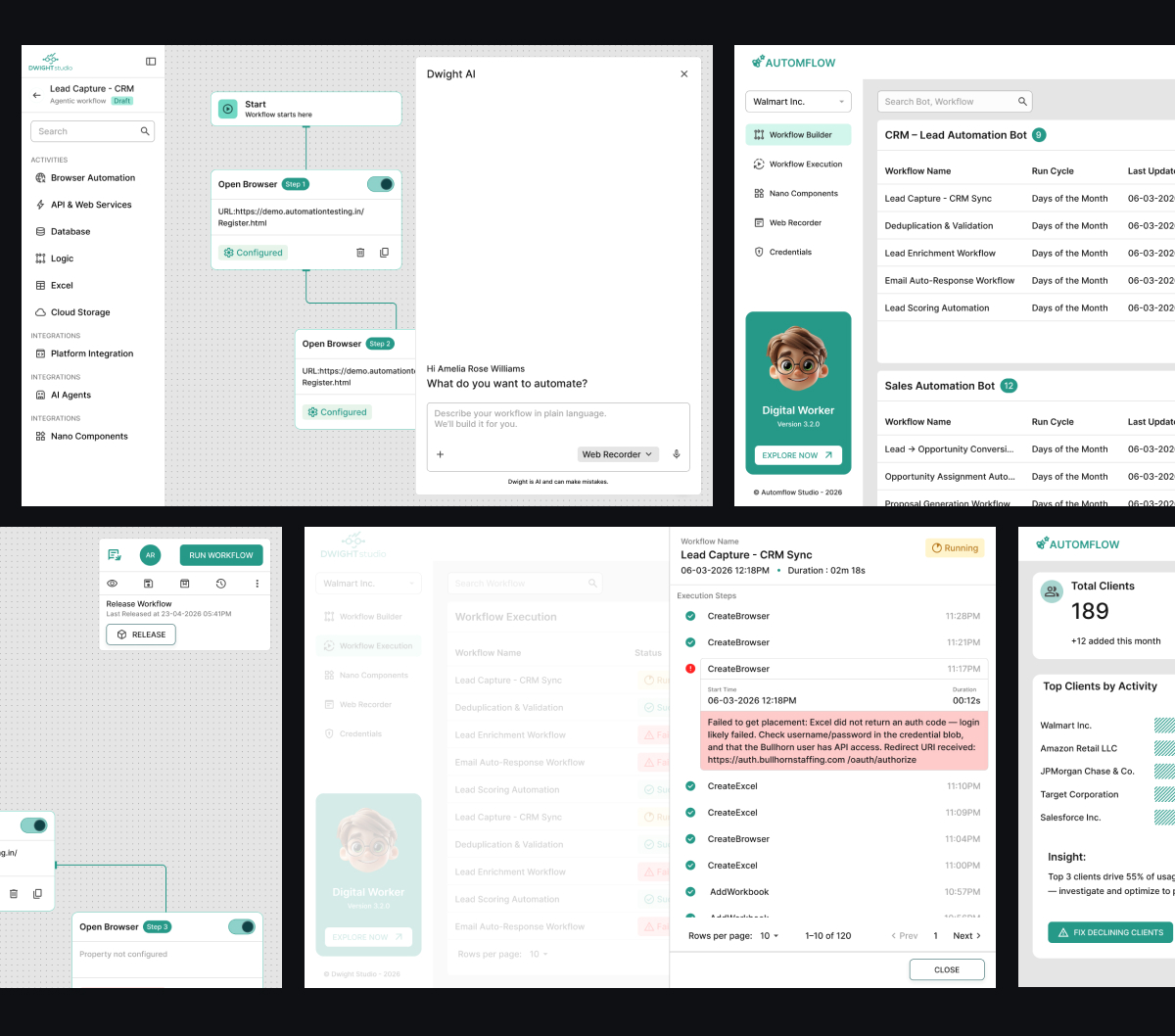
Design Decisions
Centralized Workflow Dashboard
Introduced a unified workflow dashboard to reduce context switching and improve operational visibility.
Validation State Indicators
Designed structured status patterns for:
- Success states
- Pending validations
- Failed workflows
- Manual review requirements
- Override actions
This helped operators identify issues faster.
Human Intervention Controls
Added controlled override mechanisms that balanced flexibility with operational safety.
Modular Workflow Components
Created reusable workflow patterns for:
- Workflow cards
- State indicators
- Action controls
- Validation alerts
- Automation nodes
This improved consistency and scalability across the platform.
Edge Cases Considered
Enterprise workflow systems require robust handling for operational exceptions.
Scenarios Addressed
- Failed AI validations
- Partial workflow completion
- Retry and recovery flows
- Missing input conditions
- Permission restrictions
- Workflow rollback handling
- Manual override conflicts
Design System Thinking
The platform was designed using reusable workflow components and scalable interaction patterns.
Reusable Components
- Workflow nodes
- Status indicators
- Validation banners
- Alert patterns
- Action panels
- Automation chips
- Workflow activity states
This approach improved maintainability and aligned closely with engineering implementation.
Outcomes
The redesigned workflow experience improved operational usability by:
- Reducing manual validation effort
- Improving workflow visibility
- Streamlining operator actions
- Simplifying exception handling
- Increasing transparency in AI-assisted decisions
The final solution created a more scalable operational workflow system optimized for enterprise environments.
What I Learned
Designing AI-assisted enterprise systems requires balancing:
- Automation efficiency
- Operational transparency
- Human oversight
- Scalable workflow logic
- Exception management
This project strengthened my approach toward designing operational systems where UX extends beyond interfaces into workflow behavior, system logic, and human-AI collaboration.
Final Reflection
This project reinforced my focus on designing enterprise systems where product thinking, workflow architecture, and engineering intersect.
Rather than designing isolated screens, the goal was to create a scalable operational experience that supports decision-making, automation transparency, and efficient human-AI collaboration.
ADU Aviation Mobile App
Next